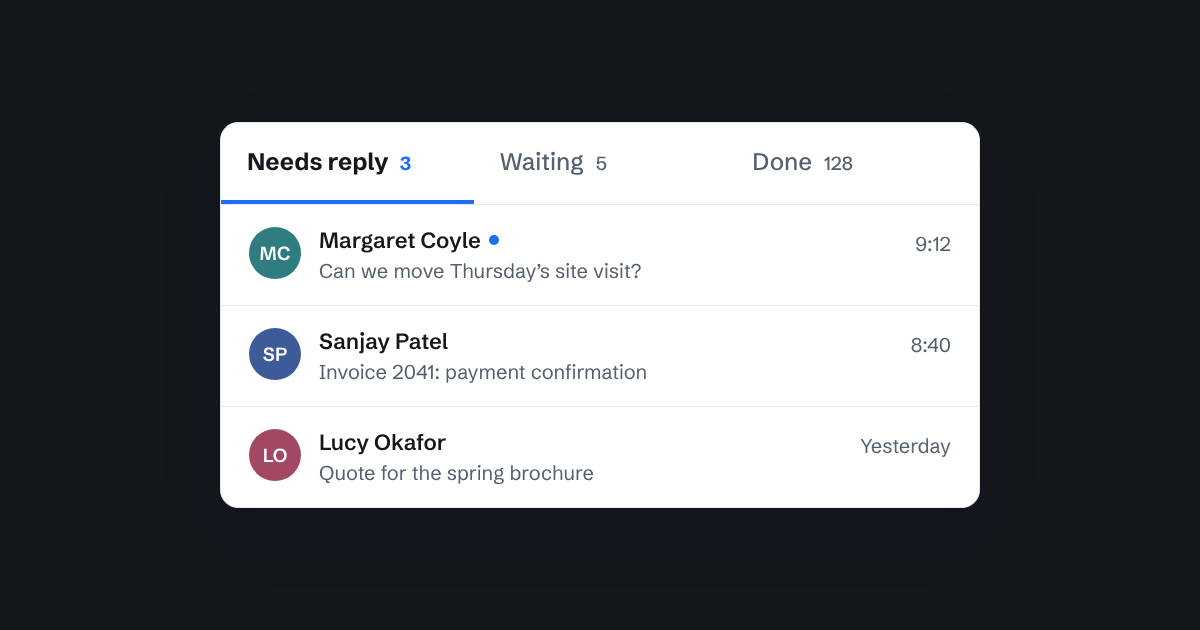
Ask a small team "which emails still need a reply?" and you'll usually get a pause, then a scroll, then a guess.
That's not carelessness. Most inboxes only know two things about an email: read or unread. Neither tells you whether anyone has answered it. A read email might have been dealt with, or someone might have opened it, meant to come back, and forgotten.
The question that matters
For a team sharing one address, the useful question isn't "has anyone seen this?" It's "whose turn is it?"
Either:
- the customer is waiting for us, so it needs a reply, or
- we're waiting for the customer, because we've replied and the ball is with them, or
- it's finished, and nobody needs to think about it again.
Those three states, Needs reply, Waiting and Done, cover almost every email a small business gets.
Let the email decide, not the person
Many tools let you set a status by hand. That's where it falls apart. People forget, or set the wrong one, or do it differently from their colleagues. After a few weeks, nobody trusts the labels.
The better approach is to work it out from the conversation itself:
- If the last message came in from the customer, it needs a reply.
- If the last message went out from the team, we're waiting.
- If someone has marked it done, it's done, and if the customer writes again it comes back to Needs reply on its own.
Nobody has to remember anything. Reply to a customer and the thread moves to Waiting. They answer, and it's back in Needs reply. The list is always right, because it comes from what actually happened.
What this changes day to day
Mornings get quicker. Instead of scrolling through yesterday's mail, you open Needs reply and work down it. When it's empty, you're done.
Nothing falls through. An email can't sit "read but unanswered" for a week, because read isn't the measure. If the customer was the last to write, it stays in Needs reply until someone responds.
Follow-ups get easier. Waiting is a list of conversations where you're expecting an answer. Glance at it once a week and chase anything that's gone quiet.
Done means done. Marking a thread done takes it off everyone's plate, and a new message from the customer brings it straight back. You don't have to keep things in view just in case.
A few tips
- Not every email needs a reply. A "thanks, that's great" from a customer will land in Needs reply. Mark it done; that's what Done is for.
- Use Done generously. It isn't deleting. Done conversations are still there and still searchable.
- Keep Needs reply short. If it's growing every day, that's a staffing or process question worth talking about, not a sorting problem.
How it works in Bosun
This is how Bosun's inbox is built. Every thread is in Needs reply, Waiting or Done, worked out from the conversation, and the counts are always on screen. Each person also has their own unread marks, so you can see what's new to you without changing what your colleagues see.
Whatever you use, try this for a week: before lunch, ask "is Needs reply empty?" It's a simple question, and having a clear answer to it changes how a team feels about its inbox.