A customer sends one email and gets two replies. One says "we can do Thursday", the other says "the earliest we have is next week". Now someone has to write a third email explaining the first two.
Double replies are one of the most common problems for small teams sharing an inbox. They're rarely anyone's fault. They happen because the tools most teams use can't tell you what a colleague is doing right now.
Why it happens
In a shared mailbox, or when several people log in to the same account, each person sees the same list of emails. Nothing on screen says "Sam is writing a reply to this one". So when an email arrives, whoever sees it first starts typing, and often so does someone else.
It gets worse at busy moments: first thing in the morning, after lunch, or when one person comes back from a meeting and starts working through everything at once.
Habits that help
Before reaching for new software, a few team habits go a long way.
Split the inbox by type, not by mood. Agree who looks after what. For example, one person handles bookings and another handles invoices. Overlap still happens, but much less.
Say when you're taking something. Some teams post "I've got the email from Margaret" in their group chat. It works, but it's one more thing to remember, and it breaks down when someone forgets.
Use the reply, not the read. Don't treat "read" as "dealt with". An email is dealt with when a reply has gone out, or when someone has decided no reply is needed.
Check before you send. If you've been writing for a while, refresh the thread before pressing send. A colleague may have answered while you were typing.
What good tools do
Habits rely on everyone remembering, every time. Tools can take the guesswork out.
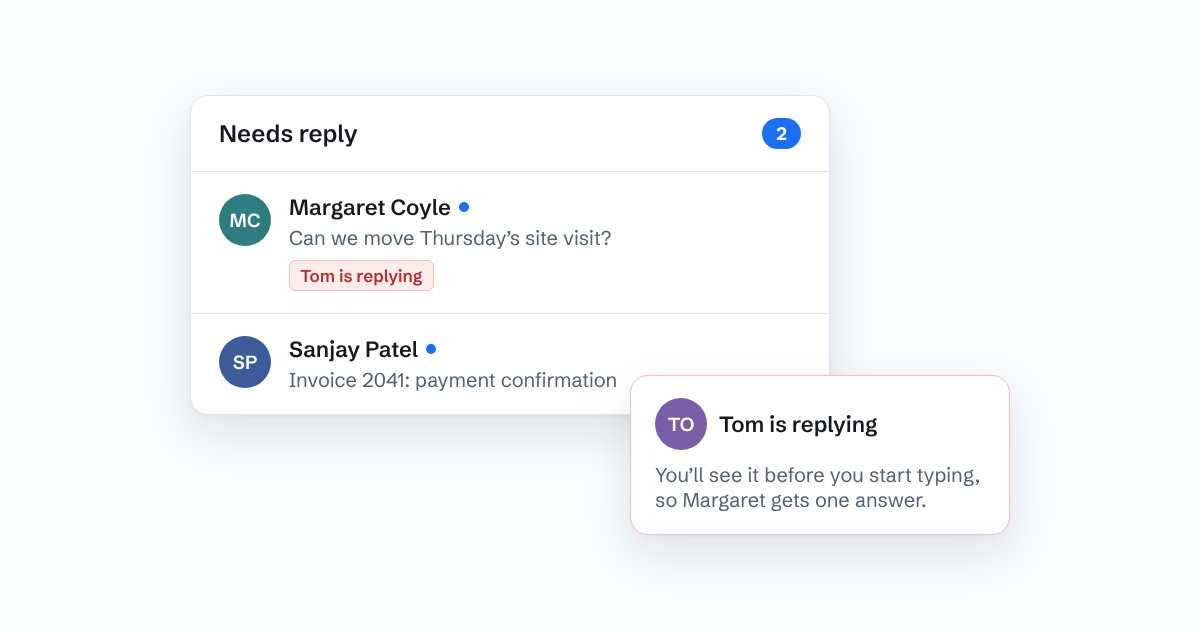
A good shared inbox shows, live, when someone else has a thread open or is writing a reply. You see it before you start typing, not after the customer has two answers. It also shows the whole conversation in one place, so a reply your colleague sent ten minutes ago is right there.
Some things to look for:
- A clear "someone is replying" signal on the list and inside the thread, not hidden in a menu.
- The full thread, including replies sent by colleagues, not just the emails sent to you.
- A way to tell answered from unanswered that doesn't depend on people remembering to mark things.
How Bosun handles it
In Bosun, when a colleague starts a reply, everyone else sees it straight away. The thread shows "Tom is replying" on the list and above the conversation. It's the only thing in the inbox shown in red, so it's hard to miss. If you open the thread anyway, you'll see the warning before you write a word.
Every reply anyone sends appears in the thread for the whole team, and the thread moves from Needs reply to Waiting on its own. Nobody has to tidy anything up.
The short version
Double replies come from not knowing what your colleagues are doing. Agree who handles what, stop treating "read" as "answered", and use an inbox that shows who is replying. Your customers will notice the difference before you do.